FrameFlow vs. Zabbix: Which Solution is Right for Your Organization?
Are you and your team searching for a new IT monitoring solution? FrameFlow and Zabbix are two monitoring solutions that enter the conversation frequently at this stage. The two products are suitable for a wide range of IT monitoring requirements, but which is right for your organization? This article will compare the two solutions and help you determine which one works best for your monitoring needs.
The Importance of Meaningful Monitoring Alerts
For any IT monitoring solution, its alerting engine is the most important feature. FrameFlow's in-app alerts are quick, consistent, and round-the-clock. You can customize the severity of our alerts and the frequency of checks to ensure that each alert you receive is meaningful and actionable. This helps prevent alert fatigue. Some users find that Zabbix alerts are too frequent when using their prebuilt monitoring templates. Over time this can cause distractions from other important tasks and may cause users to tune out alerts that indicate real problems.
 Receive Meaningful Alerts with FrameFlow
System Health Monitoring Dashboards: A Window Into Your Operations
It's important for the monitoring solution you choose to have great dashboarding abilities. Visually displaying important information such as the health of your critical systems, network diagrams, and other key metrics is a great way to keep your IT team informed of current operations and potential problems. You may even want to display data company-wide on a large monitor. FrameFlow has tools for all of that, with customizable dashboard elements and the ability to build slideshows of your favorite dashboards. Zabbix has dashboards too, but they require a logged-in user session to display dashboards, even if the intention is to show them on a public screen. Additionally, some users have reported problems with blank dashboards due to interruptions in the data feed.
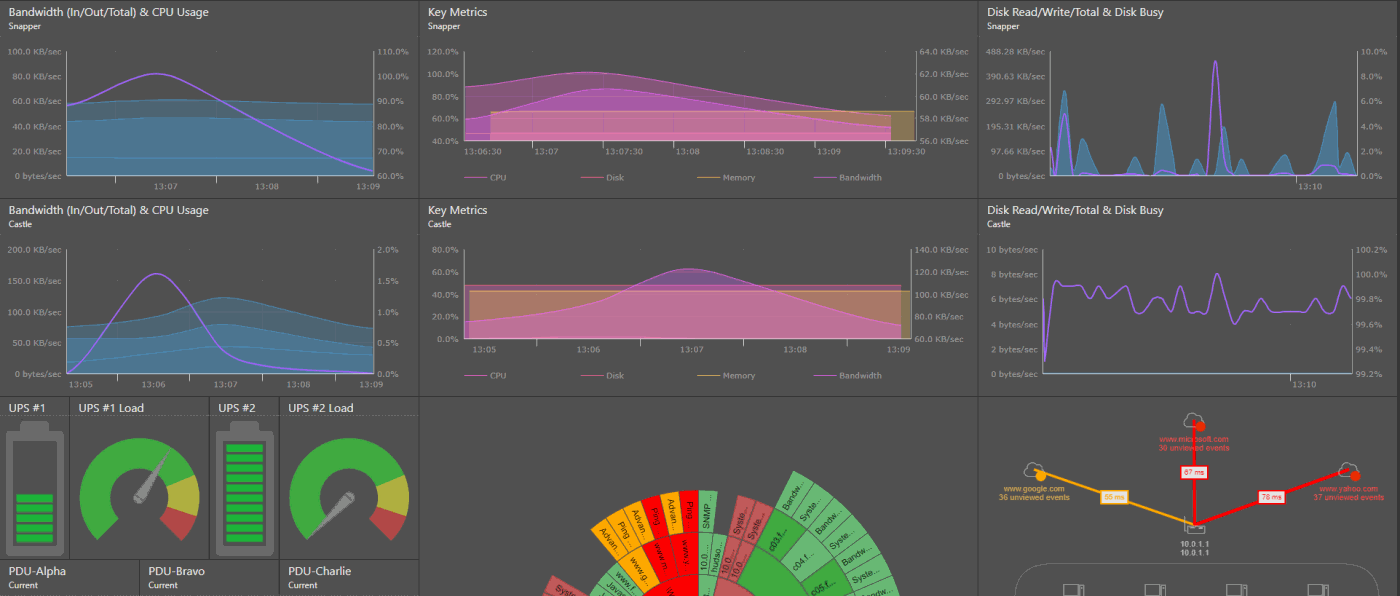 FrameFlow Dashboard Example
Open Source Flexibility vs Fully Licensed Solutions
While Zabbix is open-source, it doesn't come with support natively. FrameFlow includes support in its upfront costs. This means that from the moment you set up FrameFlow or download the free trial, you can access support directly from the FrameFlow experts who built the web app. With Zabbix, if you encounter a problem while monitoring that needs expert help, you'll need to book a sales call, buy a tiered support package, and then wait for a response. This could translate into extra downtime for your important systems.
Quotes from Current Zabbix Users
The following quotes are taken from online forums where users are discussing Zabbix.
"Zabbix isn’t 'hard' to setup. It is however, time consuming. It can be very noisy in the beginning until you get things tuned."
Zabbix setup and configuration takes crucial time and the learning curve can be steep for some users. FrameFlow runs on Windows and installs in just minutes. That means you can get started with monitoring faster. See just how fast setup is by downloading the free trial.
"I worked the last 2 years on Zabbix and I found it very confusing and resource consuming."
Although they emphasize scalability in their marketing, Zabbix can be resource-intensive in larger monitoring environments. FrameFlow scales to grow with your organization and features comprehensive monitoring for small and large organizations alike.
"The template defaults are just too sensitive. It's like I spend my entire morning putting out fires. It seems like by default Zabbix likes to alert the instant there is an issue and items that flap will just wear us out on alerts."
Zabbix alerts can create a lot of noise, making it harder for your team to parse the alerts that actually indicate a problem. FrameFlow, by comparison, has several notification tailoring features that make sure the alerts you receive are relevant and informative.
FrameFlow's 30-Day Free Trial
FrameFlow has a 30-day trial period during which you can test out every feature limit-free. Our solution is fairly and clearly priced, secure, and easy to learn. This is especially true with our wealth of resources on our knowledge base website, including a step-by-step setup guide that accompanies our 30-day free trial. If you're new to FrameFlow, we invite you to take us for a spin. Download our fully-featured free trial and you'll be up and running faster than you can read this article. Try us today to compare and contrast the two solutions yourself and see the difference FrameFlow makes.