The App Version Event Monitor watches the applications on all connected devices and alerts if any are found to be out-of-date. By using this event monitor, you can receive alerts as soon as applications are in need of an update so that no bug fixes or security updates are missed.
✔ Making sure important applications get updated ASAP
✔ Listing all out-of-date apps on connected devices
Keeping track of application versions is important for the security and functionality of your devices, but organizations often have hundreds of devices with potentially thousands of applications. You need a good tool to keep track of them all. That's where FrameFlow's App Version Event Monitor comes in.
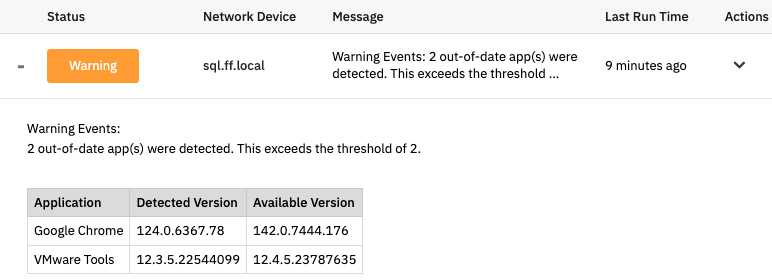 App Version Event Monitor Output
This event monitor has the option to alert you based on the number of out-of-date apps it detects. Enter the number of required application updates that will trigger each level of alert and FrameFlow will notify you when those thresholds are met. You can customize this number to fit with the size and needs of your organization.
 Application Alerting Option
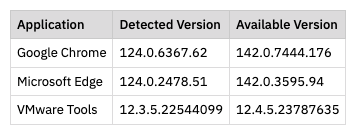
The App Version Event Monitor can also generate a table of all out-of-date applications that will appear in the text generated each time the event monitor runs. With this feature, you'll be able to view the detected version and the available version of each application listed.
The filtering options let you exclude applications from the checks that FrameFlow performs. This helps eliminate unnecessary alerts about applications that are intentionally downgraded, for example. Conversely, you can use the "Only Check the Following Apps" option to handpick a selection of applications to check. With this option enabled, FrameFlow will ignore all other applications and only check the ones you specify.
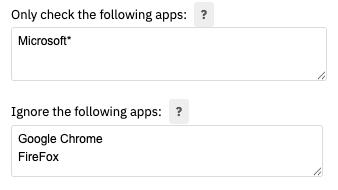 Filtering Options
For more information on this event monitor and a step-by-step setup guide, view its Technical Resources article on our knowledge base.
Need a comprehensive and unified IT monitoring solution? Try FrameFlow's 30-day full featured free trial. You'll get access to the App Version Event Monitor and our full library of over 100+ other monitors. With monitoring tools for server monitoring, network monitoring, websites, virtual machines, networking gear, and more, you'll be sure to find tools that are the perfect fit for your environment. Download the free trial, take FrameFlow for a spin, and see what it can do for your monitoring environment!
More IT Monitoring Features