Keep track of the status of your Azure resources with this comprehensive event monitor.
✔ Getting alerted about updated or removed resources
✔ Keeping a list of resources that updates each time the event monitor runs
FrameFlow's Azure Resources Event Monitor lets you keep a close eye on your Microsoft Azure resources and get alerts about changes in their status, like updates, resource removal or addition, and more.
Getting alerts around the clock is the first step to solving issues in a timely manner. Luckily, FrameFlow can send alerts via text, email, Slack/Teams message, and on its interface. You can configure the settings to send an alert of your choice of severity for each category. This means you and your team will be notified when resources are updated, removed, or added so you can take action if needed.
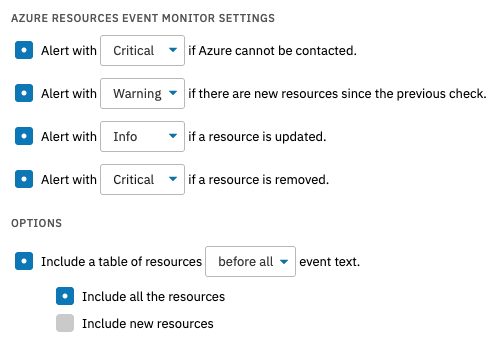 Settings Options for Azure Resources Monitor
The other major benefit of adding an Azure Resources Event Monitor to your FrameFlow config is that you can include a table of resources in the event monitor's output. This means that when the event monitor runs on your designated schedule, it'll generate an updated table of resources complete with columns for name, resource type, region, and last modified date.
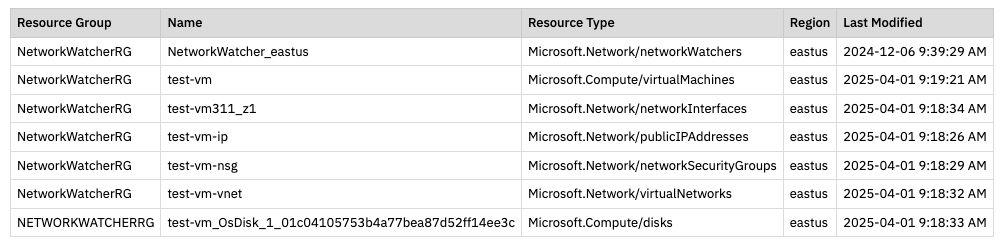 Azure Resources Table
For more information on this event monitor, including an overview of each monitoring option, view its Technical Resources article on our knowledge base. To learn more about our 120+ event monitors, check out our monitoring library.
There are so many reasons to try FrameFlow for free today. We're always adding more compatibility with Microsoft Azure, Intune, Entra ID, and more. Give FrameFlow a try for 30 days for free with the button below and get access to all our features. No credit card, no sales call, just unified monitoring for all your important devices.
More IT Monitoring Features